BUG REPORT
Block Toggle
Players who enjoyed Block Toggle also loved these









Hot titles being played across the platform
 HOT
 HOT
 HOT
 HOT
 HOT
 HOT
 HOT
 HOT
 HOT
 HOT
 HOT
 HOT
 HOT
 HOT
 HOT
 HOT
 HOT
 HOT
 HOT
 HOT
Pick another awesome game and continue playing








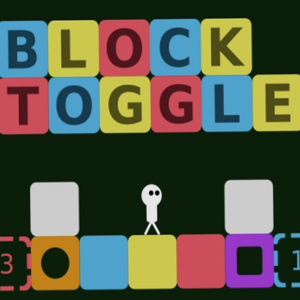
Picture this: you're a tiny glowing cube, the floor is a minefield of deadly spikes, and the only way forward is to flip reality itself. That's the hook of Block Toggle, a minimalist adventure puzzler that has quietly become a favorite among students hunting for unblocked games for school. The premise is simple — you can swap between two parallel versions of the same level, and obstacles that block you in one dimension vanish in the other. It's the kind of game that looks easy in the first ten seconds and then eats your entire lunch break.
What makes it so addictive is the rhythm. Every jump and toggle is a tiny puzzle, and once the mechanics click, you enter a flow state where your brain is planning two moves ahead in two different worlds at once. No downloads, no nonsense — just pure, brain-bending platforming that loads instantly in a browser tab.
Your objective is straightforward: guide the block from the start of each level to the glowing exit portal without touching spikes, falling into pits, or getting crushed. The twist is that the level has two states — think of them as "light" and "dark" versions of the same map. Press the toggle button and the world flips, swapping which platforms are solid and which hazards are active.
Desktop controls are clean and responsive:
On mobile, on-screen buttons appear automatically, with a dedicated toggle button on the right side. The touch controls are surprisingly tight, so it works great on a tablet during a study break. Timing is everything — toggling mid-jump is often the only way to clear a gap that looks impossible.
1. Toggle before you land, not after. The most common beginner mistake is waiting until you're standing on a platform to flip dimensions. Instead, toggle mid-air so you land directly on the solid version of the platform. This saves precious frames and keeps your momentum.
2. Learn each level's "safe zones." Every map has spots where both dimensions are safe. Memorize these and use them as checkpoints to plan your route. Once you know where you can breathe, the level becomes a series of short, manageable sprints.
3. Chain your toggles for speed. If you're chasing a high score, practice toggling in rapid succession during jumps. Advanced players can cross entire spike fields by flipping dimensions two or three times in a single leap. It looks chaotic, but it's the fastest way to clear a stage.
Yes — it's completely free and runs directly in your browser. It's one of those unblocked games premium-quality titles that doesn't ask for a cent, which is exactly why it's a staple on games unblocked cool math style portals.
Absolutely. Block Toggle is lightweight, loads in seconds, and works on any device with a modern browser. It's a top pick for classroom games unblocked because it doesn't require Flash or any downloads.
Yes, the mobile version includes touch controls that mirror the desktop layout. Just tap the on-screen buttons to move, jump, and toggle dimensions — no keyboard required.